Desk Landscape Calendar 3D Mockup for Office Branding
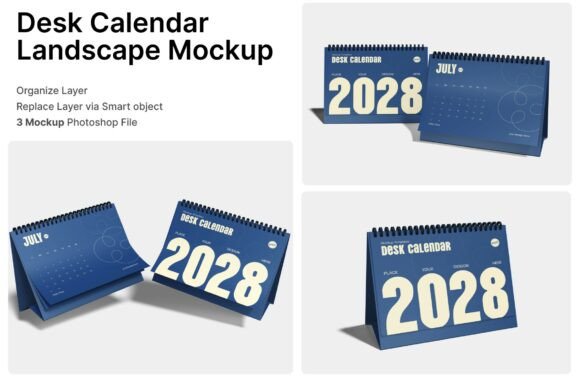
A Desk Landscape Calendar 3D Mockup is more than a presentation tool—it's a strategic asset for designers, marketers, and business professionals aiming to elevate their brand presence. This mockup offers a lifelike representation of a landscape-oriented desk calendar with spiral binding, ideal for showcasing office stationery, productivity tools, or corporate gifts. Its high-resolution format and detailed textures make it a versatile solution for visual storytelling in presentations, marketing materials, and product packaging.
Why This Mockup Stands Out
What makes the Desk Landscape Calendar 3D Mockup particularly valuable is its realism and adaptability. The mockup includes three PSD files, each offering a different viewing angle—front, angled, and side—giving you flexibility in how you present your design. These perspectives help simulate how the calendar will look in a real-world office setting, making it easier to communicate the product’s functionality and aesthetic appeal.
Smart object layers streamline the customization process. Simply double-click the layer, insert your design, and save. This feature saves time while ensuring your visuals remain crisp and professional. The included help guide and PDF documentation offer clear instructions, making the mockup accessible even for users new to Photoshop.
Creative Uses for Designers and Marketers
Designers can use the Desk Landscape Calendar 3D Mockup to prototype branded calendars for clients, whether for corporate gifting, internal planning tools, or promotional stationery. It’s especially useful for agencies working with law firms, financial institutions, or creative studios that rely on polished, branded materials to reinforce their identity.
- Create mockups for client proposals that show how a branded calendar will look on a desk
- Visualize seasonal promotions or limited-edition calendar designs
- Design packaging concepts that align with the calendar’s visual theme
Marketers can integrate this mockup into digital campaigns, social media posts, or email newsletters to showcase product offerings in a realistic context. Instead of using flat images, a 3D mockup helps potential customers envision the product in their workspace, increasing engagement and conversion rates.
Applications for Educators and Creative Professionals
Educators and workshop facilitators can use the Desk Landscape Calendar 3D Mockup to demonstrate design principles, branding strategies, or layout techniques. By showing how a well-designed calendar functions in a real-world setting, students and professionals can better understand the importance of typography, color schemes, and white space in print design.
Creative studios and freelancers can also use the mockup as part of their portfolio. Including a high-quality 3D representation of a printed calendar adds depth and professionalism to case studies and client presentations. It allows potential clients to see the final product before any physical printing takes place, reducing revisions and ensuring alignment with expectations.
How to Maximize the Mockup’s Potential
To get the most from the Desk Landscape Calendar 3D Mockup, consider the following tips:
- Experiment with themes: Use the mockup to test different color schemes, patterns, and layouts. Try minimalist designs for corporate clients or vibrant, illustrated pages for creative brands.
- Align with brand guidelines: Ensure your calendar mockup reflects the brand’s existing visual identity, including fonts, logos, and color palettes.
- Focus on clarity: Avoid overcrowding the design. Use the mockup to test how readable and visually balanced your calendar pages appear in a real setting.
- Test variations: Use each of the three included PSD files to explore different presentation styles. One might work better for a website hero image, while another suits a printed brochure.
Customization Tips for Best Results
Because the mockup uses smart object layers, you can easily swap in your designs without losing resolution or quality. Start by organizing your design files so that each page of the calendar is clearly labeled. This makes it easier to place the correct month or layout into the mockup.
When inserting images or graphics into the calendar pages, ensure they match the perspective of the mockup. For example, if the calendar is viewed at an angle, your design should reflect that same slant to maintain realism. You can use Photoshop’s warp or perspective tools to adjust the design accordingly.
Also, pay attention to lighting and shadows. The mockup already includes realistic lighting effects, but if you’re adding your own background or modifying the environment, make sure the light source aligns with the mockup’s natural highlights and shadows.
Using the Mockup Across Platforms
The Desk Landscape Calendar 3D Mockup is versatile enough to be used across multiple platforms and formats. For digital use, it can be scaled down for web banners, social media posts, or online portfolios without losing clarity. For print, the 4000 x 3000 pixel resolution and 300 dpi ensure sharp, professional results for brochures, packaging, or sales sheets.
If you’re creating a product catalog or digital lookbook, this mockup can be paired with other stationery mockups—like notebooks, planners, or business card holders—to create a cohesive visual narrative. This approach reinforces brand consistency and helps customers understand how different products fit together in a workspace.
Inspiration for Unique Calendar Concepts
While traditional calendars are often used for date tracking, the Desk Landscape Calendar 3D Mockup opens the door for more creative interpretations. Consider these ideas:
- Themed monthly calendars: Create a calendar centered around a specific theme—travel, food, wellness, or art—where each month features a relevant illustration or photo.
- Interactive elements: Design calendars with tear-off tabs, stickers, or notes to encourage daily engagement.
- Workspace inspiration: Feature motivational quotes or productivity tips on each page to appeal to professionals and entrepreneurs.
- Seasonal promotions: Use the calendar to highlight monthly offers or events for a business or service.
These variations not only make the calendar more engaging but also increase its perceived value, making it a useful tool for both personal and professional audiences.
Final Thoughts
The Desk Landscape Calendar 3D Mockup is an essential tool for anyone involved in product design, branding, or marketing. Its realistic presentation, ease of customization, and high-quality output make it a valuable asset for showcasing calendars in a professional context. Whether you're designing for corporate clients, launching a new product line, or building a portfolio, this mockup helps bring your vision to life with clarity and impact.