Restaurant Wall 3D Mockup: A Practical Tool for Realistic Branding and Visual Presentations
When it comes to showcasing a restaurant or cafe's visual identity, presentation matters. Whether you're pitching a new branding concept to a client, updating your own storefront, or preparing marketing materials for a franchise expansion, seeing how your designs look in a real-world setting can make all the difference. That’s where the Restaurant Wall 3D Mockup comes in — a powerful, user-friendly tool that brings your branding ideas to life with stunning realism.
What Exactly Is the Restaurant Wall 3D Mockup?
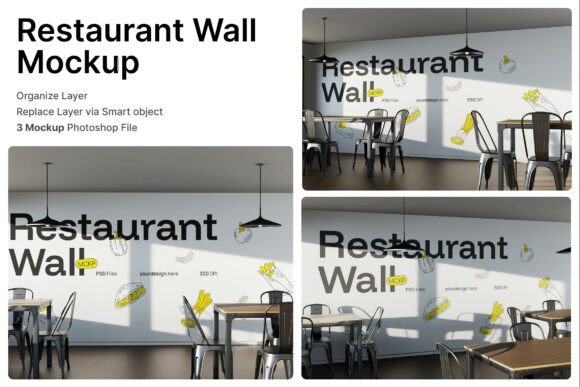
The Restaurant Wall 3D Mockup is a digital design resource that allows users to visualize how their branding graphics will appear on large interior wall surfaces in a restaurant or café setting. It includes three high-quality PSD files that simulate different indoor scenes, giving you a realistic preview of how your wall graphics, menu illustrations, or promotional banners will look in an actual dining environment.
Each file is layered with smart objects, meaning you can easily drop your design into the template by double-clicking the designated layer, placing your artwork, and saving. The included help guide ensures even beginners can navigate the process without frustration. With a resolution of 4000 x 3000 pixels at 300 dpi, the output is print-ready and suitable for both digital and physical marketing use.
Why Use a 3D Mockup for Restaurant Branding?
Imagine trying to explain to a client how a new mural or wall decal will look in their space using only flat images or sketches. It’s not just difficult — it’s risky. Miscommunication can lead to costly revisions or lost trust. With the Restaurant Wall 3D Mockup, you eliminate guesswork. You can show exactly how the colors will pop under ambient lighting, how the design fits with the existing decor, and how it contributes to the overall ambiance of the space.
For business owners and designers alike, this level of visual clarity helps in making confident decisions. It also speeds up the approval process, especially when working with stakeholders who may not be familiar with design software or terminology.
Real-World Applications Across Different Scenarios
Let’s take a look at a few realistic use cases where the Restaurant Wall 3D Mockup proves invaluable:
- Coffee Shop Makeover: A local café owner wants to refresh their brand with a new color scheme and wall graphics. They use the mockup to test out a few design variations before committing to a final look.
- Burger Restaurant Rebrand: A fast-food chain is updating its menu and branding. They need to show franchise owners how new wall illustrations and signage will look in different locations — the mockup makes it easy to create consistent, location-specific visuals.
- Marketing Agency Pitch: A design team is pitching a new restaurant concept to a client. Instead of showing flat visuals, they use the 3D mockup to present a full interior branding package that includes wall art, digital signage, and themed decor.
- Freelance Graphic Design: An independent designer is building a portfolio. They use the mockup to create realistic samples of their work for potential clients, helping them stand out in a competitive market.
- Interior Design Projects: A hospitality designer is planning the layout of a new fine dining establishment. They incorporate the mockup into their presentation to show how wall branding complements the furniture, lighting, and overall aesthetic.
Who Benefits Most from This Tool?
The Restaurant Wall 3D Mockup is especially useful for:
- Restaurateurs: Business owners who want to visualize and approve branding elements before installation.
- Graphic Designers: Professionals who need to present polished, realistic visuals to clients without spending hours on 3D modeling.
- Marketing Teams: Agencies or in-house teams looking to align branding across digital and physical spaces.
- Franchise Operators: Those managing multiple locations who need consistent visual identity across all branches.
- Interior Designers: Experts who want to integrate wall branding seamlessly into their overall design plan.
How to Get the Most Out of the Restaurant Wall 3D Mockup
While the mockup is designed for ease of use, there are a few things to keep in mind before diving in:
- Design Compatibility: Ensure your artwork is in the correct format and resolution before placing it into the smart object layers.
- Color Accuracy: Check that your colors are calibrated properly to match the intended wall materials and lighting conditions.
- Customization Options: Don’t be afraid to tweak the lighting, textures, or background elements to better match your specific space or brand.
- Use Realistic Imagery: Since the mockup doesn’t include stock images, source high-quality photos of your actual space or use royalty-free images that closely resemble your environment.
- Consider the Audience: If you're presenting to non-designers, simplify your explanation and focus on how the visuals support the brand experience rather than the technical details.
Final Thoughts: A Must-Have for Restaurant and Cafe Branding
The Restaurant Wall 3D Mockup is more than just a design tool — it's a bridge between concept and reality. Whether you're a small business owner looking to refresh your space, a designer pitching ideas to a client, or part of a larger marketing team rolling out a new campaign, this mockup gives you the visual clarity you need to make informed decisions.
By allowing you to see how your branding will look in a real dining environment, it helps reduce errors, save time, and build confidence in your design choices. And in today’s competitive hospitality market, that kind of edge is invaluable.