Enhancing Brand Presentation with Lanyard 3D Mockup
For professionals involved in corporate branding, event coordination, or product design, presenting visual concepts with clarity and realism is essential. The Lanyard 3D Mockup offers a practical solution for showcasing lanyard designs, ID cards, and badge holders in a lifelike format. This digital asset enables designers to visualize their work in real-world settings without the need for physical prototypes, streamlining the approval and presentation process.
Understanding the Lanyard 3D Mockup
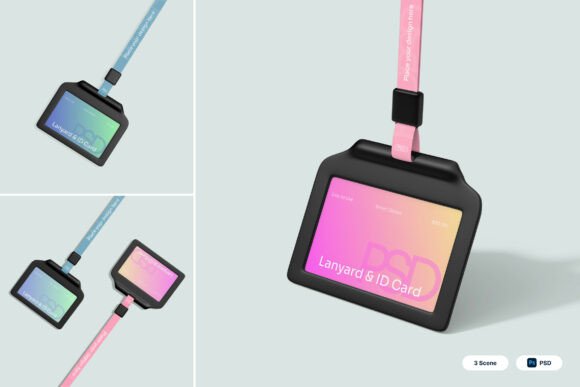
The Lanyard 3D Mockup is a digital design tool that allows users to create photorealistic representations of lanyards and ID cards. It includes three layered PSD files that support smart object integration, enabling easy customization of card graphics, strap colors, and background settings. Each file is designed to reflect different presentation angles, such as front-facing, angled, and hanging views, making it versatile for various branding scenarios.
Key Features and Practical Benefits
One of the most valuable aspects of the Lanyard 3D Mockup is its smart object functionality. Designers can simply double-click on designated layers, insert their artwork, and save the changes—resulting in an updated, high-resolution visualization. This feature eliminates the need for complex rendering or advanced 3D modeling skills, making it accessible to both novice and experienced designers.
- High-resolution output at 4000 x 3000 pixels ensures crisp visuals suitable for print and digital use.
- Customizable card areas allow for precise placement of logos, text, and QR codes.
- Realistic fabric textures and badge holder details enhance the mockup’s authenticity.
- Multiple viewing angles provide flexibility in how the final design is presented.
Who Benefits Most from This Mockup?
This mockup is particularly useful for graphic designers, marketing professionals, and event planners who need to present lanyard and ID card designs to clients or internal stakeholders. Corporate branding teams can use it to visualize employee ID cards, while event organizers may find it helpful for designing conference passes and exhibitor badges. Additionally, ecommerce businesses selling branded lanyards or office accessories can leverage the mockup to create professional product visuals without the cost of photo shoots.
Usability and Workflow Integration
Designed with Adobe Photoshop in mind, the Lanyard 3D Mockup integrates seamlessly into existing design workflows. The included PDF help guide walks users through the setup process, ensuring that even those unfamiliar with 3D mockups can start using it quickly. Layers are clearly labeled, and the smart object system maintains design consistency across multiple views.
However, users should note that stock images are not included, so background customization may require additional resources. While the mockup itself is highly detailed, achieving the best results often depends on the quality of the inserted artwork. Designers should ensure their graphics are well-aligned and color-accurate before placing them into the mockup layers.
Performance in Real-World Applications
In practice, the Lanyard 3D Mockup performs well for both internal design reviews and client presentations. For example, a marketing team preparing for a product launch can use the mockup to visualize branded lanyards for event staff, ensuring that the design aligns with the company’s visual identity before production begins. Similarly, freelance designers can use the mockup to provide clients with polished previews of ID card layouts, speeding up the feedback loop and reducing revisions.
One practical example involves a small business owner launching an online store for custom lanyards. By using the mockup, they can generate high-quality images of different strap colors and card designs, helping customers make informed choices without requiring physical samples. This not only enhances the shopping experience but also reduces return rates due to mismatched expectations.
Strengths and Limitations
The mockup’s greatest strength lies in its realism and ease of use. The attention to detail—such as the fabric texture of the lanyard strap and the reflective surface of the badge holder—makes the final output look professionally photographed. Additionally, the high-resolution format ensures that outputs remain sharp even when scaled for large-format printing.
On the downside, the mockup requires a working knowledge of Photoshop, which may be a barrier for non-designers. Also, while the included PSD files offer multiple angles, users may find themselves needing additional perspectives for comprehensive presentations, which would require sourcing or creating additional mockups.
Long-Term Value and Flexibility
Considering its reusable nature and adaptability across different branding needs, the Lanyard 3D Mockup provides solid long-term value. Once integrated into a design toolkit, it can be reused for multiple projects—whether for corporate ID programs, trade show branding, or educational institution credentials. Its flexibility in handling different color schemes, logos, and layout variations ensures that it remains relevant across diverse design briefs.
Final Thoughts and Recommendations
The Lanyard 3D Mockup is a well-crafted digital asset that simplifies the process of visualizing lanyard and ID card designs. It is particularly effective for professionals who need to present polished, realistic visuals without investing in physical prototypes or advanced rendering software. While it has a few limitations regarding image sourcing and software requirements, its benefits in terms of time savings, visual quality, and presentation impact make it a worthwhile addition to any design resource library.
If your work involves corporate branding, event planning, or product visualization, the Lanyard 3D Mockup is a practical tool to consider. It supports efficient design workflows and enhances client communication by delivering clear, professional mockups that reflect real-world applications.