Easter Postcard 3D Mockup: A Practical Design Tool for Spring Celebrations
If you're someone who creates content, markets products, or simply enjoys crafting personalized holiday greetings, the Easter Postcard 3D Mockup could be a valuable addition to your design toolkit. This resource is more than just a digital template — it's a flexible, high-quality solution for anyone looking to present Easter-themed designs in a polished, professional format.
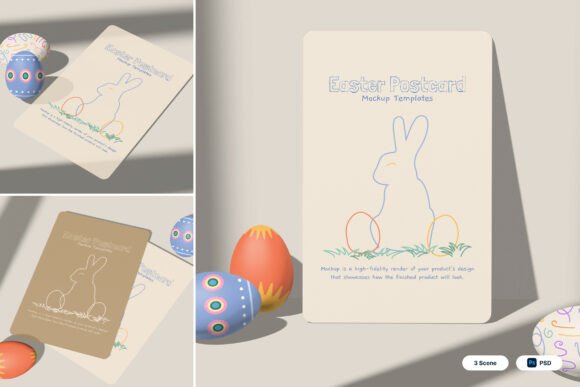
The mockup features a soft, spring-inspired aesthetic with rounded corners, festive illustrations, and gentle background scenes that evoke the warmth and renewal of the season. Designed for ease of use, it includes three PSD files with smart object layers, allowing you to simply double-click a layer, insert your design, and save. The included PDF help guide ensures even beginners can navigate the process smoothly.
When and Why You Might Use an Easter Postcard 3D Mockup
Whether you're a small business owner, a freelance designer, or someone planning a personal celebration, the right visual presentation can make a big difference. The Easter Postcard 3D Mockup shines in situations where you need to showcase seasonal designs in a realistic, engaging way.
For example, if you're a local bakery launching a special Easter menu, you might use this mockup to create promotional postcards that reflect your branding. Instead of flat images, you can present your design in a 3D setting that feels tangible and festive — perfect for sharing on social media or printing for in-store displays.
Similarly, educators or church organizers planning Easter events can benefit from using this mockup to visualize invitation designs. By seeing how the final printed piece will look in a real-world context, you can make better decisions about layout, color scheme, and overall aesthetic.
Realistic Use Cases Across Different Scenarios
- Branding for Easter Campaigns: Marketers launching seasonal promotions can use the mockup to preview branded postcards that align with their campaign visuals. This helps ensure consistency across digital and print materials.
- Freelance Design Portfolios: Designers can showcase their Easter-themed work in a professional way by embedding their artwork into the mockup, giving potential clients a clearer idea of the final product.
- Small Business Stationery: Boutique shops or local cafes might create custom Easter greeting cards or thank-you notes using this template, giving their brand a polished, seasonal touch.
- Event Invitations: From Easter egg hunts to community dinners, this mockup helps planners visualize how their printed invites will look before going to print.
- Online Merchandise Displays: Etsy sellers or online retailers offering Easter-themed items can use the mockup to create product visuals that stand out in digital marketplaces.
Who Benefits Most from This Mockup?
The Easter Postcard 3D Mockup is especially useful for those who need to present their designs in a visually appealing format without the complexity of building mockups from scratch. Here's how different users might apply it:
- Entrepreneurs: Small business owners promoting Easter specials can use the mockup to create cohesive marketing materials that feel professionally designed.
- Bloggers and Influencers: Content creators sharing holiday ideas can use the mockup to generate high-quality visuals for their posts or social media stories.
- Teachers and Event Planners: Anyone organizing school events or community gatherings can use it to design and preview printed materials like flyers or invitations.
- Graphic Designers: Whether you're a pro or just starting out, having a ready-made 3D mockup saves time and helps you deliver more polished results to clients.
Things to Consider Before Using This Mockup
While the Easter Postcard 3D Mockup is user-friendly, there are a few practical points to keep in mind before downloading or applying it:
- Software Requirements: Since it's a PSD file, you'll need Adobe Photoshop to edit the smart object layers. If you don’t have access to Photoshop, consider using a free trial or checking if alternative tools can open the file format.
- Image Stock: The product description mentions that image stock is not included, so you’ll need to source your own photos or illustrations to insert into the design. Make sure they’re high-resolution to maintain the mockup’s professional quality.
- Customization Limits: While the smart layers make it easy to place your design, the overall style of the mockup is somewhat fixed. If you’re looking for something with a bold or modern edge, this soft, pastel-toned version may not be the best fit.
- Print Readiness: Though the file is high-resolution (4000 x 3000 pixels, 300 dpi), always double-check with your printer’s specifications to ensure compatibility and color accuracy.
Getting the Most Out of Your Easter Postcard 3D Mockup
To truly make the most of this tool, consider how it fits into your broader design or marketing workflow. For instance, if you're a content creator planning a spring-themed social media campaign, you can use the mockup to generate cohesive visuals that tie your posts together.
Another practical approach is to use the mockup as part of a client pitch. Instead of showing flat designs, you can present a 3D visualization that demonstrates how the final printed product will look in a real-world setting. This can help clients better understand and appreciate your design choices.
If you're new to using mockups, start by experimenting with one of the included PSD files. Follow the PDF help guide step-by-step to insert your design and see how it looks in 3D. Once you're comfortable, try adjusting colors or adding your own background elements to personalize the presentation.
Final Thoughts
The Easter Postcard 3D Mockup isn’t just another digital template — it's a practical solution for anyone who wants to showcase Easter-themed designs in a professional, visually appealing way. Whether you're designing for personal use, a business campaign, or creative portfolio, this mockup can help you save time while elevating your results.
By understanding how and when to use it — and what to consider before diving in — you can make the most of this seasonal design tool and bring your Easter ideas to life with confidence.