Rectangle Sticker 3D Mockup: A Practical Tool for Realistic Packaging and Branding Presentations
Bringing Sticker Designs to Life with Realistic 3D Visualization
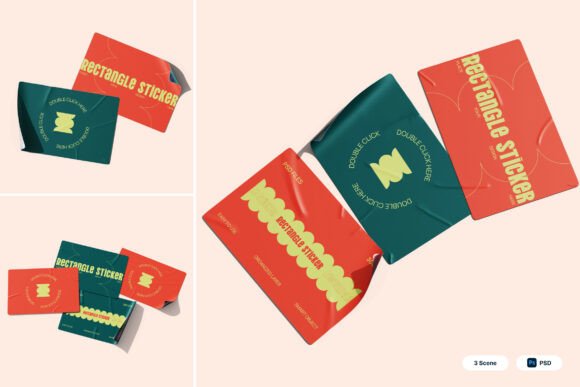
For designers, marketers, and business owners working on product packaging or promotional materials, the Rectangle Sticker 3D Mockup offers a powerful way to visualize sticker designs in lifelike settings. This mockup pack includes three high-resolution PSD files that simulate adhesive sticker sheets with curled edges, flexible textures, and multiple presentation angles. Whether you're designing for retail branding, shipping labels, or promotional decals, this tool helps you showcase your work in a way that feels authentic and professional.
Real-World Uses Across Industries
The versatility of the Rectangle Sticker 3D Mockup makes it valuable across a wide range of applications. Here are a few real-world scenarios where this mockup shines:
- Ecommerce Packaging: Online sellers often rely on branded stickers to reinforce their identity on shipping packages. This mockup allows them to preview how their sticker designs will look on actual packaging materials before printing.
- Retail Branding: Brands launching new product lines can use the mockup to present label designs to stakeholders or packaging vendors, ensuring alignment with their visual identity.
- Merchandise Tags: Apparel and accessory brands can visualize how tags or brand seals will appear on hangtags or product inserts, helping them make design decisions quickly.
- Promotional Decals: Event planners or marketing agencies can mock up custom stickers for campaigns, trade shows, or giveaways without the need for physical samples.
How Different Users Benefit from the Mockup
Depending on your role and project needs, the Rectangle Sticker 3D Mockup can serve different purposes:
- Graphic Designers: Can streamline client presentations by embedding their sticker artwork into realistic scenes, making it easier to get approvals and reduce revisions.
- Small Business Owners: Can visualize how their branding will appear on product labels or packaging without investing in printed prototypes, saving time and money.
- Marketing Teams: Can create cohesive brand mockups for internal reviews or external pitch decks, especially when launching new products or campaigns.
- Printers and Packaging Suppliers: Can use the mockups to demonstrate how sticker placement will look on finished products, improving communication with clients.
Designing with Realism in Mind
One of the standout features of the Rectangle Sticker 3D Mockup is its attention to detail. The curled edges, textured surfaces, and varied angles mimic real-world conditions where stickers are applied. This realism is especially helpful when presenting designs to clients or stakeholders who need to see how a sticker will interact with different materials and environments.
For example, a beverage brand designing a label for a new line of craft sodas can use the mockup to simulate how the sticker will look on glass bottles. Similarly, a stationery brand creating custom address labels can preview how the sticker's texture and placement will appear on envelopes or packaging inserts.
Using the Mockup Effectively: What to Consider
While the Rectangle Sticker 3D Mockup is user-friendly, there are a few things to keep in mind to get the most out of it:
- Smart Object Layers: The mockup uses smart objects, which allow you to easily insert your design by double-clicking the layer, placing your artwork, and saving. Make sure your design is in the correct size and resolution to avoid distortion.
- High-Resolution Output: With a resolution of 4000 x 3000 pixels at 300 dpi, the mockup is suitable for both digital and print use. However, be mindful of file sizes when working with large presentations or multiple mockups.
- Customization Options: While the mockup includes realistic textures and backgrounds, you may want to adjust lighting or shadows to better match your brand’s aesthetic or the intended use case.
- Image Stock Not Included: Any images shown in the mockup (such as background scenes or product shots) are not included in the download. You’ll need to provide your own or use royalty-free images if needed.
Strengths and Limitations
Like any design tool, the Rectangle Sticker 3D Mockup has its advantages and some limitations to be aware of:
Strengths:
- Professional Presentation: The 3D effect and realistic textures elevate the appearance of sticker designs, making them look more polished and market-ready.
- Time-Saving: Eliminates the need for photo shoots or physical samples, especially during the early design stages.
- Versatile Application: Suitable for a wide range of sticker types including product seals, barcode labels, and promotional decals.
Potential Limitations:
- Requires Photoshop: Since the mockup is in PSD format, users need Adobe Photoshop or a compatible program to edit the files.
- Learning Curve: Those unfamiliar with smart object layers may need a quick refresher or use the included PDF help file to navigate the setup.
- Custom Backgrounds Needed: If you’re using the mockup for a specific environment (like a retail shelf or shipping box), you may need to add your own background images for full immersion.
When to Use This Mockup in Your Workflow
The Rectangle Sticker 3D Mockup is most effective during the presentation and approval phases of a project. It works well when:
- You need to show a design to a client or team without printing physical samples.
- You're creating a portfolio or case study and want to display your sticker designs in a professional context.
- You're preparing marketing materials or social media visuals that feature your product packaging or branding elements.
It's also a great tool for entrepreneurs launching a product on platforms like Shopify or Etsy. Being able to show a clean, realistic mockup of your sticker design can help build trust with potential buyers and improve conversion rates.
Final Thoughts: A Valuable Asset for Visual Communication
The Rectangle Sticker 3D Mockup is more than just a design template—it's a practical solution for anyone looking to present sticker-based branding in a visually compelling way. Its realistic textures, flexible use cases, and easy customization make it a go-to resource for designers, marketers, and business owners alike. Whether you're refining a product label, designing a promotional decal, or preparing a packaging mockup for a client, this tool helps you visualize your ideas with clarity and confidence.