Envelope 3D Mockup for Realistic Design Presentations
Creating a strong visual impression matters more than ever in today’s design-driven world. Whether you're pitching a brand identity, sharing a formal invitation, or presenting business stationery, the way your work appears can influence perception and engagement. The Envelope 3D Mockup offers a professional, realistic way to showcase envelope-based designs with minimal effort and maximum impact.
What Makes the Envelope 3D Mockup Stand Out
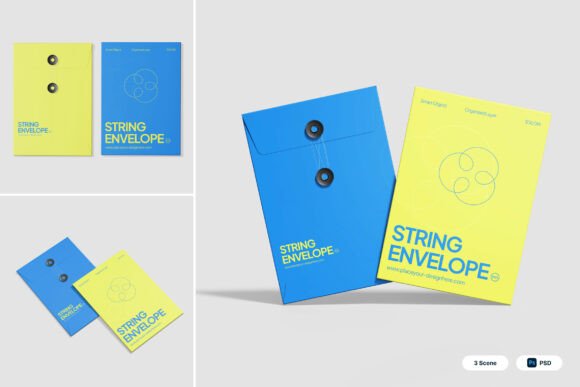
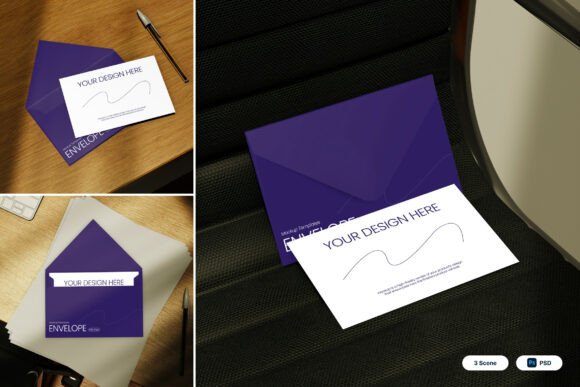
This mockup pack is designed with precision and usability in mind. It includes three high-quality PSD files, each offering multiple viewing angles to give you flexibility in how you present your designs. The mockup features realistic paper textures, natural lighting, and accurate envelope folds, making it ideal for designers who want to create authentic visuals without the need for physical prototypes.
Each file uses smart object layers, allowing you to easily insert your design by simply double-clicking the layer, placing your artwork, and saving. This streamlined workflow makes the Envelope 3D Mockup accessible even to those with limited Photoshop experience.
Professional-Quality Presentation for Diverse Uses
From corporate correspondence to wedding invitations, the versatility of this mockup makes it a valuable asset across multiple design disciplines. The clean stationery layouts and professional mailing presentation scenes ensure that your designs are displayed in a context that matches their intended use.
Here are some real-world applications where this mockup shines:
- Brand Identity Presentations: Show how your logo and color scheme look on official company envelopes.
- Event Invitations: Present wedding, birthday, or event invitations with a polished, realistic touch.
- Marketing Materials: Demonstrate how direct mail pieces will appear before going to print.
- Educational Projects: Help design students visualize how their concepts translate into physical formats.
- Freelance Design Portfolios: Display your envelope designs in a professional setting to impress potential clients.
Why Realism and Detail Matter
The attention to detail in the Envelope 3D Mockup — including accurate folds, lighting, and paper textures — helps bridge the gap between digital design and tangible output. This realism is crucial when presenting to clients or stakeholders who may not be familiar with interpreting flat design files.
High-resolution output (4000 x 3000 pixels at 300 dpi) ensures that your visuals remain sharp and print-ready, whether you're sharing them online or in printed form. The mockup’s natural lighting and varied angles also allow for dynamic presentations that can be tailored to different moods or contexts.
How to Use the Mockup Effectively
While the Envelope 3D Mockup is user-friendly, there are a few best practices to keep in mind to get the most out of it:
- Match the Envelope Style: Choose the angle and layout that best reflects the real-world use of your design. A formal business envelope may require a different presentation than a casual event invite.
- Use Consistent Branding: Ensure that your design elements align with the brand or theme you're representing. The mockup enhances your work, but the design itself must already be cohesive.
- Test Different Backgrounds: Since the mockup doesn’t include background images, experiment with different scenes or color schemes to find the most compelling visual context.
- Review for Print Readiness: Always double-check your design dimensions and bleed areas before finalizing, especially if the envelope will be printed.
Who Should Consider This Mockup
The Envelope 3D Mockup is a practical tool for a wide range of users. Here’s how different professionals can benefit:
- Graphic Designers: Quickly generate high-quality visuals for client presentations or portfolio use.
- Marketers: Showcase direct mail campaigns or branded stationery in a realistic setting.
- Entrepreneurs: Present business correspondence with a polished, professional appearance.
- Event Planners: Share invitation mockups with clients before printing.
- Educators: Teach design students how to present their work in real-world applications.
Comparing Value and Usability
When evaluating mockup tools, it's important to consider both usability and visual fidelity. The Envelope 3D Mockup strikes a balance between ease of use and professional output. Its smart object layers eliminate the need for complex editing, while the high-resolution files ensure your visuals remain crisp and detailed.
Unlike some mockups that feel generic or overly stylized, this one maintains a clean, realistic aesthetic that works across industries. The included PDF help file ensures that even first-time users can navigate the setup without frustration.
Things to Keep in Mind
While the Envelope 3D Mockup provides everything you need to create stunning visuals, there are a few considerations to keep in mind:
- Image Stock Not Included: You’ll need to provide your own background images or scenes to complement the mockup.
- Photoshop Required: Although the smart object workflow is simple, you’ll need Adobe Photoshop to edit the files.
- File Size: At 4000 x 3000 pixels, the files are large and may require more storage space and processing power.
Final Thoughts
The Envelope 3D Mockup is more than just a visual tool — it’s a way to enhance communication, improve client presentations, and streamline the design review process. By offering realistic, high-quality visuals with minimal effort, it helps designers and professionals present their work with confidence and clarity.
Whether you're designing for print, digital sharing, or portfolio display, this mockup gives you the flexibility and quality you need to make a lasting impression. If you're looking for a reliable, professional-grade solution for showcasing envelope-based designs, the Envelope 3D Mockup is a smart investment that delivers real value across a variety of creative and commercial applications.