Ticket Events 3D Mockup for Concerts & Festivals
What Is Ticket Events 3D Mockup?
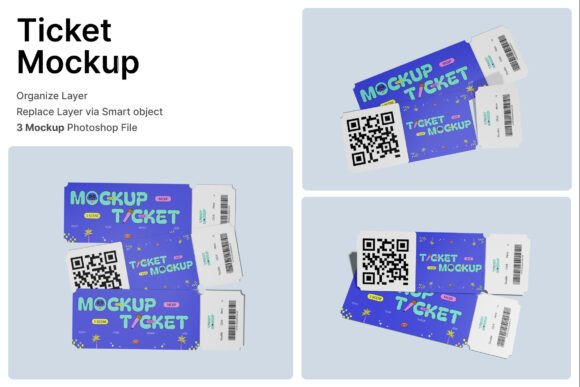
The Ticket Events 3D Mockup is a digital design tool that helps creators and event planners visualize ticket designs in a realistic, layered format. With three included PSD files and smart object layers, users can easily insert their artwork, logos, or branding elements by double-clicking a layer, placing the design, and saving. Designed for high-resolution output at 4000 x 3000 pixels and 300 dpi, it ensures professional-grade visuals for print or digital use. This mockup supports a variety of event types, including concerts, film screenings, amusement parks, sports events, and conferences.
Why This Mockup Matters Across Industries
Event planning and promotion require clear, visually appealing materials. Whether you're a small business owner launching a local concert or a marketer preparing for a large-scale festival, the way tickets look can influence audience perception and ticket sales. The Ticket Events 3D Mockup helps users create polished, realistic ticket visuals without needing advanced 3D modeling skills. It's especially valuable for those who want to preview how physical or digital tickets will appear in real-world settings before printing or publishing.
Beginners: Simple Design Previews
For newcomers to design or event planning, this mockup offers an accessible way to visualize ticket layouts. With a built-in help guide and smart object layers, users can insert their designs with minimal effort. This removes the need for complex 3D rendering software or in-depth graphic design knowledge. Beginners can quickly generate professional mockups to share with team members, clients, or printers.
Experienced Designers: Streamlined Workflow
Design professionals often juggle multiple projects and deadlines. The Ticket Events 3D Mockup integrates smoothly into existing workflows by supporting Photoshop and offering layered, editable files. Experienced users can customize lighting, shadows, and angles to match brand guidelines or event themes. This flexibility makes it a reliable tool for creating high-quality promotional assets quickly.
Event Organizers: Marketing and Branding
For concert promoters, festival coordinators, and event marketers, first impressions matter. A well-designed ticket mockup can be used in social media posts, email campaigns, or printed materials to build excitement. The inclusion of barcode and QR code sections ensures that the mockup reflects real-world functionality while maintaining visual appeal. Organizers can use these visuals to pitch sponsors, secure venue approvals, or generate early interest.
Educators and Trainers: Teaching Design Concepts
Design educators can use this mockup as a teaching aid to show students how digital assets translate into physical products. By walking through the layers and smart object workflow, instructors can demonstrate how mockups help bridge the gap between concept and execution. It's a practical example of how design tools are used in real-world creative industries.
Key Features and Practical Uses
The Ticket Events 3D Mockup includes several features that cater to different design and presentation needs:
- Smart Object Layers: Insert your design with a simple double-click and save, ideal for fast iterations.
- High-Resolution Output: Suitable for print or digital use thanks to 4000 x 3000 pixel dimensions and 300 dpi clarity.
- Barcode and QR Code Sections: Add scannable elements to simulate real ticket functionality.
- Stacked Ticket Layouts: Showcase multiple ticket types or variations within a single image.
These features make the mockup especially useful for:
- Music Festival Planners: Preview how VIP, early bird, and general admission tickets will look in print or digital format.
- Theater and Cinema Marketers: Present ticket designs to stakeholders before committing to print runs.
- Conference Organizers: Use mockups in promotional materials to show ticket tiers, sponsor logos, and access levels.
- Freelance Designers: Offer clients a realistic preview of ticket branding without building custom 3D models.
How to Decide If This Mockup Fits Your Needs
When evaluating the Ticket Events 3D Mockup, different users may prioritize different aspects:
- Beginners: Look for ease of use and clear instructions. This mockup scores well with its intuitive smart object workflow and included help guide.
- Professionals: Consider flexibility and quality. The layered PSD files and high-resolution output make it suitable for commercial projects.
- Business Owners: Focus on presentation and branding. The ability to show stacked tickets with barcodes makes it ideal for promotional use.
- Hobbyists: May value creativity and learning potential. This tool allows for experimentation with layout, branding, and visual storytelling.
Real-World Examples
Here are a few ways different users might apply this mockup:
- A local concert promoter uses the stacked ticket layout to show different price tiers on a Facebook post, generating early ticket sales.
- A freelance graphic designer inserts a client's festival logo into the mockup and shares a preview before finalizing the design for print.
- A university instructor walks students through the smart object layers to explain how designers prepare assets for real-world use.
- A small theater owner creates a digital version of their movie night tickets to use in email campaigns and social media.
Final Thoughts
The Ticket Events 3D Mockup is a versatile tool that supports a wide range of creative and commercial needs. Whether you're designing for a large music festival or a local community event, this mockup helps you present your ticket designs with clarity and professionalism. Its user-friendly features make it accessible to beginners, while its high-quality output and customization options satisfy experienced designers and marketers. If you're looking for a way to streamline your ticket design process and improve how your event visuals are received, this mockup could be a valuable addition to your toolkit.