iPad Pro 3D Mockup for Dynamic Digital Presentations
For professionals and creators needing to visually communicate app interfaces, digital products, or branding concepts, the iPad Pro 3D Mockup offers a powerful, flexible solution. This high-resolution mockup set enables designers, marketers, and entrepreneurs to present their work in a realistic, engaging format that enhances clarity and professionalism. Whether you're pitching a new app, showcasing a UI design, or promoting a digital product, this mockup delivers a clean, modern aesthetic that aligns with today's design standards.
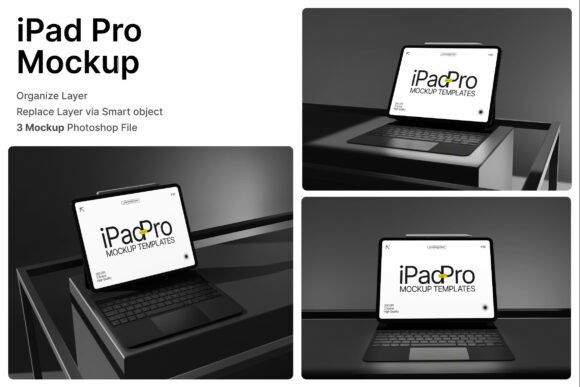
At its core, the iPad Pro 3D Mockup is a presentation tool that simulates a tablet device in various angles and configurations. It includes a stylized iPad Pro paired with a keyboard, allowing users to display their digital content in both standalone and productivity-focused setups. The inclusion of multiple perspective views ensures that presenters can choose the most appropriate angle for their message, whether it's a front-facing presentation, angled view, or side profile.
What Makes This Mockup Stand Out
One of the standout features of the iPad Pro 3D Mockup is its smart object layers, which streamline the customization process. By simply double-clicking a layer in Photoshop, you can insert your design, save the file, and instantly see your work rendered in a realistic environment. This smart layer functionality saves time and reduces complexity, especially for designers who need to create multiple presentation variations quickly.
The mockup comes in three separate PSD files, each offering a different perspective. This variety supports a wide range of presentation styles and ensures your content is adaptable across different contexts. Each file is set at a high resolution of 4000 x 3000 pixels with 300 dpi, making them suitable for both digital and print use. The included PDF help guide ensures that even those unfamiliar with advanced Photoshop features can navigate and use the mockup effectively.
Practical Applications Across Industries
The versatility of the iPad Pro 3D Mockup makes it an excellent choice for a variety of industries and use cases. In the creative sector, UI/UX designers can use it to present app interfaces, website mockups, or digital dashboards to clients or stakeholders. The realistic tablet setup enhances the perception of usability and design quality, helping clients visualize how the final product will function in real life.
For entrepreneurs and startups, the mockup serves as a valuable asset when pitching to investors or launching a product. A well-designed presentation using the iPad Pro 3D Mockup can significantly elevate the perceived value of a digital product, making it easier to communicate the user experience and overall brand identity. Whether you're showcasing a SaaS dashboard, a mobile app prototype, or an e-learning interface, the mockup adds a layer of professionalism that static wireframes or flat images cannot match.
In the education and training space, instructors and course creators can use the mockup to demonstrate digital learning platforms, mobile apps, or interactive course interfaces. Presenting these tools in a realistic tablet environment helps learners understand how they'll interact with the platform, improving engagement and comprehension. It's also useful for e-learning marketing materials, where visual clarity and user experience are key to converting potential students.
How It Enhances Branding and Marketing
When it comes to branding and marketing, first impressions matter. The iPad Pro 3D Mockup allows brands to showcase their digital products in a visually compelling way that aligns with modern design trends. Whether you're building a portfolio, creating a product landing page, or preparing a pitch deck, the mockup helps reinforce a clean, innovative brand image.
For digital agencies and creative studios, this mockup is an essential tool for client presentations. It allows you to embed your UI/UX designs into a realistic context, helping clients better understand the look and feel of the final product. Additionally, using the keyboard setup option can demonstrate how your design integrates with productivity workflows, which is especially useful when presenting enterprise or business applications.
From a marketing standpoint, the mockup is ideal for promoting software products, mobile apps, or digital tools on websites, social media, and online portfolios. The ability to show your product in action within a high-quality, 3D-rendered environment increases visual appeal and can significantly improve user engagement metrics. Whether you're launching a new app or redesigning a digital product, this mockup ensures your visuals are as polished and professional as your actual work.
Real-World Use Cases and Recommendations
Consider a freelance designer preparing a portfolio for a potential client. Using the iPad Pro 3D Mockup, they can showcase their app interface designs in a way that feels immersive and realistic. Instead of presenting flat screenshots, they can insert their UI work into the tablet view, giving clients a tangible sense of how the app will appear and function on an actual device.
Another example is a SaaS company launching a new dashboard interface. By using the keyboard-enabled view, they can demonstrate how users will interact with the platform in a productivity setting. This not only enhances the visual appeal of the presentation but also communicates functionality and ease of use more effectively than static images.
If you're considering using the iPad Pro 3D Mockup in your workflow, here are a few practical tips:
- Test multiple perspectives to see which angle best communicates your message. Front-facing views are great for clarity, while angled shots add depth and realism.
- Customize the background to match your brand colors or presentation theme. Since the mockup is layered in PSD format, you can easily adjust the background or add your own textures.
- Use consistent lighting when inserting your design to maintain a natural look. Pay attention to shadows and reflections to ensure your design blends seamlessly with the mockup environment.
- Pair with other mockups for a cohesive presentation. If you're showcasing a full digital product, consider combining this mockup with smartphone or desktop versions for a multi-device experience.
Final Thoughts
The iPad Pro 3D Mockup is more than just a visual tool—it's a strategic asset for anyone involved in digital design, branding, or product marketing. Its combination of high resolution, smart object layers, and multiple perspectives makes it a versatile and efficient choice for a wide range of applications. Whether you're a designer, marketer, educator, or entrepreneur, this mockup helps you present your digital work with clarity, professionalism, and impact.