Enhancing Packaging Design with Gift Box 3D Mockups
Creating compelling packaging is essential for brands looking to stand out in a competitive market. Whether you're designing for a subscription box, promotional merchandise, or retail product presentation, a Gift Box 3D Mockup can significantly streamline the visualization process. This versatile tool allows designers and business owners to showcase packaging concepts with realistic detail and professional polish.
What Is a Gift Box 3D Mockup?
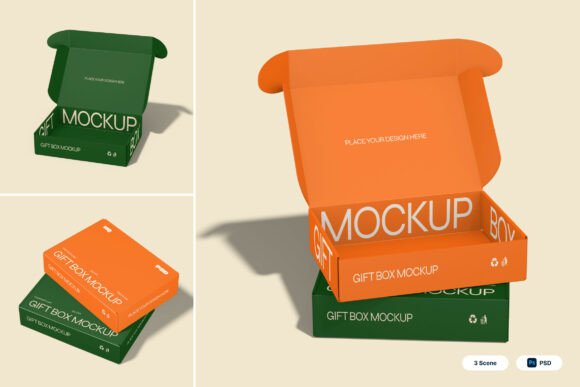
A realistic gift box 3D mockup is a digital template used to visualize packaging designs in a lifelike setting. It typically features foldable packaging structures, detailed views of box lids, and customizable branding areas. These mockups are ideal for presenting product packaging, unboxing experiences, and brand identity elements without the need for physical prototypes.
Designed for ease of use, the Gift Box 3D Mockup includes smart object layers that allow users to insert their designs with just a few clicks. By double-clicking a layer, placing the design, and saving, users can generate high-quality visuals suitable for client presentations or marketing materials.
Key Features of the Mockup
- Smart Object Layers: Simplify the design insertion process for quick customization.
- High-Resolution Output: The mockup is available in 4000 x 3000 pixels at 300 dpi, ensuring crisp, print-ready visuals.
- Detailed Packaging Views: Includes foldable structures and box lid perspectives for a comprehensive presentation.
- Customizable Branding Areas: Ideal for showcasing logos, product names, and other branding elements.
- Comprehensive File Support: Comes with 3 PSD files and a PDF help guide for easy navigation and setup.
Who Benefits from Using This Mockup?
The Gift Box 3D Mockup is a valuable resource for a wide range of professionals and creators. Here’s a breakdown of who can benefit the most:
Product Designers
Designers working on product packaging can use the mockup to visualize how their artwork will appear on a real gift box. This helps in refining color schemes, layout positioning, and overall aesthetic appeal before production.
Marketing Teams
Marketing professionals can create compelling visuals for campaigns, social media, or email newsletters. The mockup allows them to present packaging designs in a realistic context, helping stakeholders visualize the final product.
E-commerce Business Owners
For online sellers, first impressions matter. Using a Gift Box 3D Mockup, business owners can showcase their product packaging on websites or packaging landing pages, enhancing brand perception and customer experience.
Brand Managers
Brand managers can ensure consistency across packaging materials by using the mockup to preview how logos, taglines, and other brand elements integrate with the box design.
Where Can the Gift Box 3D Mockup Be Used?
This mockup is highly versatile and can be applied across various industries and use cases. Some of the most common applications include:
Retail Packaging Presentations
Retail brands can use the mockup to present new packaging concepts to internal teams or external partners. It allows for a professional and polished look that helps in decision-making during the design phase.
Subscription Box Branding
Subscription services often rely on unique packaging to build brand identity. The mockup enables creators to experiment with different box designs and layouts to create a memorable unboxing experience.
Promotional Merchandise Design
Companies creating promotional gift boxes for events or client gifts can visualize how their branding will appear on the packaging before production.
E-commerce Product Pages
Online retailers can enhance product listings by showing packaging mockups alongside the actual product. This helps customers understand the presentation they’ll receive, especially for gift items.
Unboxing Campaigns
With the rise of unboxing videos and social media content, having a realistic mockup helps brands plan how their packaging will look in video or photo content shared by customers.
Strengths of the Gift Box 3D Mockup
The Gift Box 3D Mockup offers several advantages that make it a go-to tool for packaging visualization:
- Time Efficiency: Eliminates the need for physical prototypes, saving time and resources during the design phase.
- Professional Quality: High-resolution output ensures that presentations and marketing materials look polished and professional.
- Easy Customization: Smart object layers make it simple for both beginners and experienced designers to apply their artwork.
- Versatile Use: Suitable for a wide range of packaging types, from luxury gift boxes to subscription service packaging.
Considerations and Limitations
While the Gift Box 3D Mockup is a powerful tool, there are a few considerations to keep in mind when using it:
- Software Requirements: The mockup requires Adobe Photoshop to edit smart object layers. Users unfamiliar with Photoshop may need to invest time in learning the basics or seek assistance from a designer.
- Image Stock Not Included: All image stock used within the mockup is not included, so users must provide their own background images or textures if desired.
- Design Accuracy: While the mockup provides a realistic preview, slight differences may occur when transitioning from digital to physical packaging due to material and printing variations.
Real-World Applications and Examples
Here are a few practical examples of how the Gift Box 3D Mockup can be used effectively:
Case Study: Launching a New Luxury Candle Line
A boutique candle brand wanted to launch a new line of luxury candles with custom gift boxes. Using the mockup, the design team visualized multiple packaging options, tested different color schemes, and presented the final selection to investors and manufacturers. This allowed them to finalize the design quickly and confidently.
Case Study: Subscription Box Preview for Social Media
A subscription box company used the mockup to create teaser images for an upcoming holiday edition. The 3D visuals were shared on Instagram and Facebook to build excitement among subscribers before the official launch.
Case Study: Corporate Gifting Campaign
A tech startup preparing for a product launch created custom gift boxes for clients and media. The team used the mockup to test different branding elements and ensure consistency with their company’s visual identity before printing.
How to Evaluate Suitability for Your Project
When considering whether the Gift Box 3D Mockup is right for your needs, ask yourself the following questions:
- Do you need a realistic preview of your packaging design? If yes, this mockup provides a highly detailed and accurate representation.
- Are you working on a time-sensitive project? The ease of use and quick customization make this mockup ideal for fast turnaround times.
- Do you have access to Adobe Photoshop? Since the mockup is provided in PSD format, Photoshop is required for full customization.
- Are you planning to print the packaging? The high-resolution output ensures that the mockup can support print-ready visuals when needed.
Conclusion
In today’s visually driven market, presenting packaging designs in a realistic and professional manner is crucial. The Gift Box 3D Mockup offers a powerful solution for designers, marketers, and business owners looking to visualize their packaging concepts without the need for physical prototypes. With its detailed structure, customizable branding areas, and high-resolution output, this mockup is a valuable asset for anyone involved in product packaging, branding, or marketing. Whether you're preparing for a product launch, designing a subscription box, or creating promotional materials, the Gift Box 3D Mockup can help bring your vision to life efficiently and effectively.