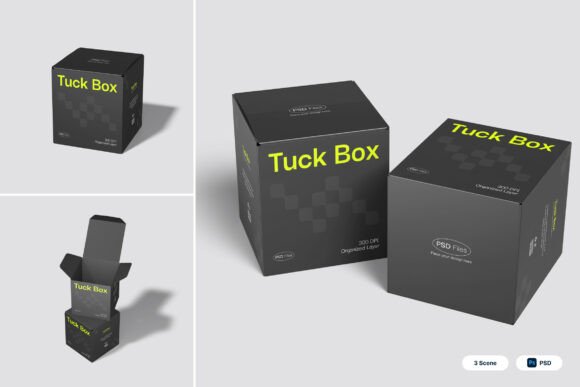
Tuck Box 3D Mockup for Realistic Packaging Presentations
Designing packaging that stands out on shelves or online requires more than just a great concept — it demands a clear, realistic visual representation. The Tuck Box 3D Mockup offers a streamlined way to present folding carton designs with professional polish. Whether you're a product designer, brand strategist, or small business owner, this tool simplifies the process of turning 2D artwork into a lifelike mockup that communicates your brand's quality and attention to detail.
Why Realistic Packaging Mockups Matter
In today's competitive market, packaging is often the first physical interaction a customer has with a brand. A well-crafted tuck box design can influence purchasing decisions, reinforce brand identity, and enhance unboxing experiences. However, presenting a flat image of your design doesn't always convey how it will look in real life. That's where the Tuck Box 3D Mockup comes in — it allows designers to simulate realistic folding carton structures with sharp edges, accurate creases, and a premium matte finish.
This level of realism helps stakeholders, clients, and customers visualize the final product more effectively. Whether you're pitching a new cosmetic line or preparing packaging for a subscription box, having a high-quality 3D mockup can make the difference between approval and revision requests.
How the Tuck Box 3D Mockup Enhances Design Workflow
The mockup includes three layered PSD files with smart object layers, enabling designers to quickly insert their artwork and generate photorealistic visuals. By simply double-clicking a layer, placing your design, and saving, you can create a mockup that reflects the true structure of a tuck box. This feature is especially valuable for designers who need to iterate quickly or present multiple design options to clients.
For freelancers or in-house creative teams, this streamlined workflow reduces the time spent on manual mockup creation. Instead of building 3D models from scratch or relying on generic templates, the Tuck Box 3D Mockup provides a ready-to-use foundation that maintains structural accuracy and visual appeal.
Perfect for Premium Packaging Aesthetics
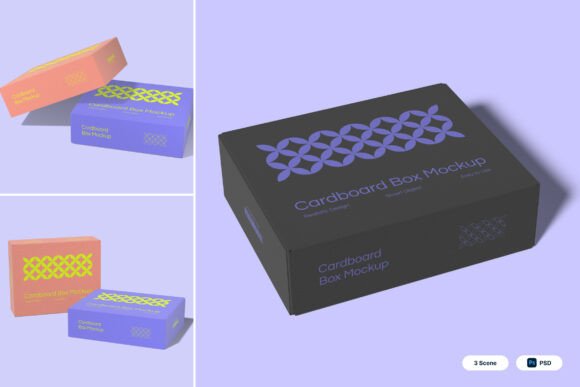
The mockup’s dark monochrome palette paired with vibrant accent typography supports a modern, high-end look that aligns with contemporary retail trends. This makes it especially suitable for industries like cosmetics, tech merchandise, and luxury goods, where packaging plays a key role in brand perception.
For example, a skincare brand launching a new product line can use the mockup to showcase minimalist design elements, clean typography, and subtle textures that communicate sophistication. Similarly, an ecommerce brand preparing for a product launch can generate mockups that reflect how the packaging will appear in promotional photos or on product pages.
Supporting Creative Communication and Client Presentations
Clear visual communication is essential when working with clients or internal teams. The Tuck Box 3D Mockup helps bridge the gap between concept and reality by offering a tangible preview of how a design will look in its final form. This is especially useful during early-stage presentations or when gathering feedback from non-design stakeholders.
Additionally, the high-resolution output (4000 x 3000 pixels at 300 dpi) ensures that the mockups are print-ready and suitable for both digital and physical presentations. Whether you're preparing a pitch deck for investors or a product catalog for retailers, the visual quality of the mockup supports a professional and cohesive brand image.
Who Benefits Most from This Mockup?
- Product designers looking to showcase folding carton structures with realistic creases and folds
- Brand managers aiming to align packaging with brand identity and retail positioning
- Ecommerce entrepreneurs preparing product visuals for online stores or crowdfunding campaigns
- Marketing teams creating visuals for packaging presentations, social media, or email campaigns
- Freelancers who need to deliver polished mockups quickly and efficiently
Each of these roles benefits from the mockup’s ability to translate 2D designs into three-dimensional representations that reflect real-world applications. Whether you're working on a limited budget or tight deadline, this tool helps maintain design integrity without compromising on quality.
Understanding the Limitations and Fit
While the Tuck Box 3D Mockup is highly versatile, it's important to consider whether it aligns with your specific design needs. Since the included image stock is not part of the package, users will need to supply their own background images or lifestyle visuals to enhance the mockup's realism in certain contexts.
Additionally, while the mockup supports a dark monochrome aesthetic with bold typography, it may require customization if your brand uses a different color scheme or surface texture. In such cases, users with moderate Photoshop skills can adjust layers to match their brand guidelines, but those with limited design experience may find customization challenging.
Maximizing the Value of the Tuck Box 3D Mockup
To get the most out of this tool, consider the following tips:
- Use high-resolution artwork when inserting designs into smart layers to maintain clarity
- Pair mockups with lifestyle images to create a stronger brand narrative
- Experiment with different lighting and background options to match your brand’s tone
- Save customized versions of the PSD files for reuse in future projects
- Refer to the included PDF help guide for step-by-step instructions and best practices
Conclusion: A Practical Tool for Modern Packaging Design
The Tuck Box 3D Mockup is more than just a visual aid — it's a practical solution for designers and brand professionals who need to present packaging concepts with confidence. By combining realistic folding carton structures, sharp edges, and a premium matte finish, it helps communicate design intent clearly and professionally. Whether you're refining a product line, preparing for a client meeting, or enhancing your portfolio, this mockup supports a more efficient and visually compelling design process.
For those looking to streamline their workflow, improve presentation quality, and ensure that packaging designs translate effectively into real-world applications, the Tuck Box 3D Mockup offers a valuable and accessible resource.