Samsung S25 3D Mockup: Elevating Digital Branding and UI/UX Presentations
The Samsung S25 3D Mockup has emerged as a powerful tool for designers, marketers, and entrepreneurs aiming to present mobile applications, branding concepts, and digital interfaces in a professional and visually compelling manner. With its high-resolution renderings and customizable smart object layers, this mockup kit offers a seamless way to visualize how a digital product integrates into a premium smartphone environment.
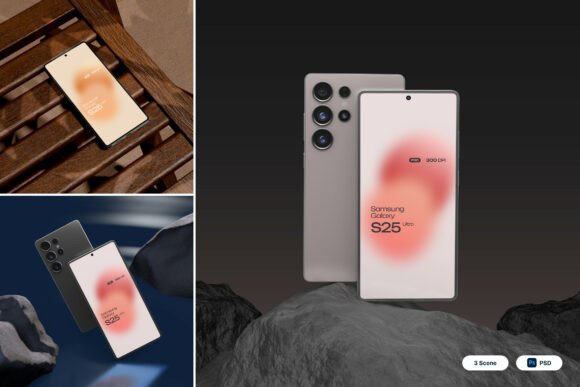
Unlike generic mockup templates, the Samsung S25 3D Mockup provides a realistic portrayal of a flagship smartphone, capturing the sleek design and modern aesthetics that users have come to expect from Samsung devices. This realism is crucial when presenting designs to stakeholders, clients, or audiences who need to see how a product will appear in real-world scenarios.
Key Features That Define the Samsung S25 3D Mockup
One of the standout aspects of this mockup set is the inclusion of three layered PSD files, each offering multiple angles and perspectives of the Samsung S25. These files are structured with smart object layers, allowing users to easily insert their own designs by simply double-clicking the relevant layer, placing their artwork, and saving the changes. This functionality streamlines the design process and ensures that even those with minimal Photoshop experience can produce polished visuals.
The high-resolution 4000 x 3000 pixel size at 300 dpi ensures that every detail remains crisp and clear, whether the output is destined for print, digital advertising, or web use. This level of quality is essential for professional presentations, especially when showcasing products to investors, clients, or on high-traffic platforms like Shopify or Behance.
Additionally, the package includes a comprehensive PDF help file and a guide document, both of which assist users in navigating the layers and understanding how to make the most of the mockup's features. These resources are especially helpful for newcomers who may not be familiar with advanced Photoshop techniques but still want to create high-quality visuals quickly.
Practical Applications Across Industries
The versatility of the Samsung S25 3D Mockup makes it a valuable asset across a wide range of industries and use cases. In the realm of UI/UX design, it allows designers to preview how their interface layouts will appear on a modern smartphone screen. This helps in refining the user experience before actual development begins, reducing the need for costly revisions later on.
For mobile app developers, the mockup serves as an effective way to demonstrate app functionality and design aesthetics to potential users or investors. Whether it's a productivity app, a gaming interface, or a social media platform, the Samsung S25 3D Mockup provides a realistic backdrop that enhances the credibility of the presentation.
Marketers and digital advertisers also benefit from using this mockup set. It allows them to create visually engaging promotional materials that reflect the look and feel of a premium device. This is particularly useful when launching new campaigns or presenting app store screenshots that need to stand out in a crowded marketplace.
E-commerce businesses can leverage the mockup to showcase their mobile-optimized websites or branded apps, helping customers visualize how their experience will translate to mobile devices. Startups, in particular, can use these visuals to build trust and credibility during pitch presentations or crowdfunding campaigns.
Customization and Flexibility
One of the most appealing aspects of the Samsung S25 3D Mockup is its flexibility. The customizable interface areas allow designers to insert their own branding elements, app icons, screen layouts, and even background environments. This adaptability ensures that the mockup can be tailored to fit a variety of branding strategies and design aesthetics.
Designers can experiment with different color schemes, typography choices, and visual elements without altering the core structure of the mockup. This makes it an ideal tool for A/B testing different design concepts or presenting multiple branding options to a client.
Furthermore, the ability to adjust lighting, shadows, and perspective within the PSD files allows for a more natural integration of the designer’s content. This attention to detail enhances the realism of the final output and ensures that the visuals appear cohesive and professional.
Considerations for Effective Use
While the Samsung S25 3D Mockup offers a wealth of features, there are a few considerations to keep in mind to ensure optimal results. First, it's important to note that the stock images used within the mockup are not included in the package. Users will need to source their own background images or product visuals to complement the mockup design.
Additionally, while the smart object layers simplify the customization process, some familiarity with Adobe Photoshop is still beneficial. Users who are completely new to the software may find the learning curve a bit steep, but the included help guide provides step-by-step instructions to ease the transition.
Another consideration is file size. Due to the high resolution and layered structure, the PSD files can be quite large and may require a computer with sufficient processing power and memory to handle them smoothly. However, this is a small trade-off for the level of detail and customization the mockup offers.
Real-World Impact and Brand Perception
In today’s visually driven market, first impressions matter more than ever. The Samsung S25 3D Mockup helps brands and designers make a strong visual impact by presenting their digital products in a realistic and polished format. This not only enhances the perceived value of the product but also builds trust with the audience.
When used effectively, mockups like this can serve as a bridge between concept and reality, allowing users to visualize the end product before it’s fully developed. This is especially important in fast-paced industries where time-to-market is a critical factor.
Moreover, the ability to generate high-quality visuals quickly means that teams can iterate faster, test different design directions, and respond to feedback more efficiently. In a competitive landscape, this agility can be the difference between success and stagnation.
Conclusion
The Samsung S25 3D Mockup is more than just a design tool—it’s a strategic asset that empowers designers, marketers, and entrepreneurs to communicate their vision clearly and effectively. By combining realism, customization, and ease of use, it provides a platform for showcasing digital products in a way that resonates with audiences and enhances brand credibility.
Whether you're developing a new mobile app, launching a startup, or creating marketing materials for an upcoming product release, the Samsung S25 3D Mockup offers the tools you need to bring your ideas to life with precision and professionalism. Its adaptability across industries and use cases makes it a valuable addition to any creative toolkit, ensuring that your digital presentations stand out in an increasingly visual world.