iPhone 16 Case 3D Mockup: A Practical Tool for Designers and Brands
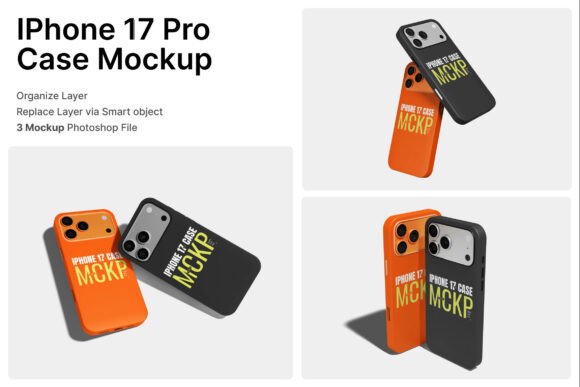
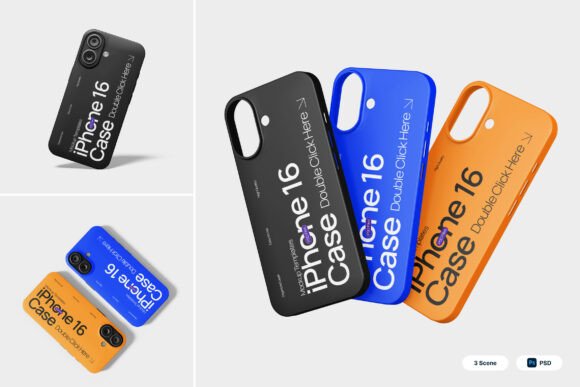
The iPhone 16 Case 3D Mockup is a digital asset designed for graphic designers, product marketers, and branding professionals who need to showcase iPhone case designs in a realistic and visually appealing format. This mockup package includes three high-resolution PSD files, a PDF help guide, and smart object layers that streamline the design integration process. With a resolution of 4000 x 3000 pixels at 300 dpi, it's suitable for both digital and print use, especially in branding, packaging, and online retail environments.
Why Consider the iPhone 16 Case 3D Mockup?
Designers and brands often need to visualize how a product will look before it goes into production or marketing. The iPhone 16 Case 3D Mockup offers a realistic preview of how a case design will appear on the actual device. This is particularly useful for:
- Product presentations: Creating professional visuals for client pitches or internal reviews.
- E-commerce listings: Displaying case designs in a clean, modern layout that attracts online shoppers.
- Brand consistency: Ensuring that all promotional materials reflect the same high-quality aesthetic.
The mockup's sleek design, with its matte finish and floating composition, aligns with current tech aesthetics, making it a versatile choice for modern mobile branding and gadget merchandise.
Key Features and Benefits
The iPhone 16 Case 3D Mockup is built with usability and flexibility in mind. Here are some of its standout features:
- Smart object layers: Simply double-click a layer, insert your design, and save — no need for complex editing.
- High-resolution output: The 4000 x 3000 pixel size ensures clarity for both digital and print applications.
- Clean, modern layouts: The mockup uses a bold color palette and minimalist design to highlight the case without distracting from the product.
- Three included PSD files: Offers variety in presentation styles and usage scenarios.
These features make the mockup ideal for designers who need to produce polished visuals quickly without compromising quality. The inclusion of a PDF help guide also ensures that even those unfamiliar with advanced Photoshop techniques can navigate the file structure with ease.
Tradeoffs and Considerations
While the iPhone 16 Case 3D Mockup offers many advantages, it’s important to consider its limitations and how they might impact your workflow:
- Photoshop dependency: The mockup requires Adobe Photoshop or a compatible program to edit smart objects. Users without access to this software may find it less accessible.
- Image stock not included: Any background or lifestyle images used in the sample visuals are not part of the package, which may require additional sourcing for custom presentations.
- Learning curve for beginners: While the help guide is useful, users unfamiliar with PSD layers and smart objects may need to invest time in learning the basics.
If your design needs are minimal or you're working with tight deadlines, it may be worth exploring simpler or more automated tools. However, for those who require professional-grade visuals, the learning investment can be well worth the effort.
When This Mockup Is a Strong Fit
The iPhone 16 Case 3D Mockup is especially beneficial in the following scenarios:
- Branding and marketing campaigns: When presenting a cohesive and modern look for mobile accessories across digital platforms.
- Product packaging design: For creating accurate and visually engaging mockups that reflect the final product’s appearance.
- Online retail stores: Offering high-quality visuals that help customers visualize the product before purchase.
- App and digital product promotions: When integrating phone accessories into app store visuals or tech-related digital content.
In these contexts, the mockup’s combination of realism, flexibility, and aesthetic appeal can significantly enhance the visual quality of your output.
When Alternatives May Be Worth Considering
Depending on your specific needs, there may be alternative tools or approaches that better suit your project:
- 3D rendering software: If you need full control over lighting, angles, and materials, dedicated 3D modeling tools may offer more customization.
- Online mockup generators: For users who want to avoid Photoshop entirely, web-based tools can offer quicker, drag-and-drop mockup creation.
- Photographed product images: In cases where absolute realism is required, professional photography may be more effective than digital mockups.
Each alternative has its own set of pros and cons. For example, 3D rendering software offers more control but requires technical expertise, while online generators are user-friendly but often lack the resolution and detail of a premium mockup like the iPhone 16 Case 3D Mockup.
Practical Insights for Decision-Making
When deciding whether to use the iPhone 16 Case 3D Mockup, consider the following questions:
- Do you need high-resolution visuals for both digital and print use? If yes, this mockup’s 4000 x 3000 pixel resolution and 300 dpi quality make it a strong contender.
- Are you comfortable using Photoshop or willing to learn? The smart object layers simplify the design process, but some familiarity with the software is necessary.
- Is visual consistency across your product line important? This mockup helps maintain a uniform look across branding materials, packaging, and digital assets.
- Do you need quick turnaround times? The pre-built layouts and help guide can significantly speed up the design process compared to creating visuals from scratch.
If your answers lean toward needing high-quality, consistent visuals and you have access to Photoshop or team members who do, this mockup is likely a solid investment.
Final Thoughts
The iPhone 16 Case 3D Mockup is a well-constructed digital tool that provides designers and brands with the resources needed to create compelling, professional visuals. Its clean aesthetic, smart object integration, and high-resolution output make it suitable for a variety of branding and marketing applications. However, it's most effective when used by individuals or teams with access to Photoshop and a need for consistent, high-quality product presentations.
Before purchasing or implementing this mockup into your workflow, evaluate your project scope, design capabilities, and long-term branding goals. If the features align with your needs and you're prepared to invest a little time in setup and customization, the iPhone 16 Case 3D Mockup can be a valuable asset in your design toolkit.