iPhone 17 Pro 3D Mockup for Modern Design Presentations
For professionals in design, marketing, and technology, presenting a mobile app or digital product with precision and visual appeal is essential. The iPhone 17 Pro 3D Mockup offers a streamlined way to showcase digital work in a realistic, high-quality format. Whether you're pitching an app idea, updating a portfolio, or preparing marketing materials, this mockup simplifies the process while elevating the final presentation.
What Makes the iPhone 17 Pro 3D Mockup Stand Out
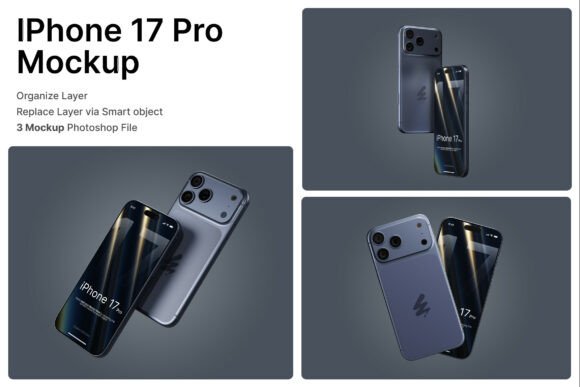
This mockup is designed with practicality and visual fidelity in mind. Built using smart object layers, it allows users to insert their screen designs with minimal effort. Simply double-click the designated layer, place your design, and save — no complex editing required. The package includes three PSD files, each offering a different device perspective, giving you flexibility in how you present your work.
The high-resolution format (4000 x 3000 pixels at 300 dpi) ensures that your visuals remain crisp and professional, whether viewed on screen or printed for physical presentations. Each file also comes with a PDF help guide, making it easy for both beginners and experienced designers to navigate the setup quickly.
Realistic Visuals for Premium Presentations
One of the most valuable aspects of the iPhone 17 Pro 3D Mockup is its attention to realism. The device renderings are detailed, featuring accurate textures, lighting, and depth that reflect the actual iPhone 17 Pro. This level of realism is especially important when presenting to clients, stakeholders, or potential investors who expect a polished and professional look.
The mockup also supports floating phone arrangements, which can be useful for creating dynamic layouts in digital branding or product showcase materials. These arrangements help highlight different angles and screen interactions, making them ideal for app developers and UI designers who need to demonstrate functionality and aesthetics simultaneously.
Practical Uses Across Industries
The versatility of the iPhone 17 Pro 3D Mockup makes it a valuable tool across multiple fields. Here are a few real-world applications:
- App Developers: Use the mockup to visually demonstrate app interfaces and user flows without needing a physical device.
- UI/UX Designers: Showcase screen transitions, button placements, and overall design coherence in a realistic context.
- Digital Marketers: Create compelling visuals for social media, landing pages, or email campaigns that reflect the latest iPhone design trends.
- Entrepreneurs: Present app ideas to investors with professional mockups that convey both concept and execution quality.
- Educators and Trainers: Use the mockup to visually explain mobile design principles or demonstrate app functionalities in teaching materials.
Benefits Beyond Visual Appeal
While the visual quality is a major draw, the iPhone 17 Pro 3D Mockup also enhances usability and efficiency. Designers can save time by avoiding complex 3D rendering workflows, focusing instead on refining their screen content. This efficiency is especially valuable when working under tight deadlines or managing multiple client projects.
From a branding perspective, using a realistic and up-to-date device mockup helps align your presentation with current technology trends. This alignment can subtly reinforce your brand’s modernity and attention to detail, which is crucial in competitive markets.
How to Get the Most from the Mockup
To fully leverage the iPhone 17 Pro 3D Mockup, consider the following tips:
- Use High-Resolution Assets: Since the mockup supports high-resolution output, ensure your screen designs are also at a similar quality to maintain clarity.
- Experiment with Layouts: Try different floating phone arrangements to find the most engaging composition for your specific use case.
- Customize Lighting and Background: While the default setup is well-designed, adjusting lighting and background elements can help your presentation stand out even more.
- Pair with Complementary Visuals: Combine the mockup with other design assets like interface animations or usage scenarios to create a more immersive presentation.
Considerations When Choosing a Mockup
Not all mockups are created equal. When selecting a tool like the iPhone 17 Pro 3D Mockup, evaluate the following factors:
- Compatibility: Ensure the file format (PSD in this case) is compatible with your design software and workflow.
- Editability: Smart object layers simplify the editing process, but it's still important to understand how to work within Photoshop or similar tools effectively.
- Image Licensing: The package does not include stock images used inside the mockup, so be prepared to source your own visuals or use your own screen designs.
- Scalability: Check that the resolution is suitable for both digital and print use, especially if you plan to use the mockup in a variety of formats.
Final Thoughts
The iPhone 17 Pro 3D Mockup is more than just a visual tool — it’s a practical solution for anyone looking to present mobile app designs or digital products with professionalism and ease. Whether you're a UI designer refining a new interface, a marketer crafting campaign visuals, or an entrepreneur pitching a product, this mockup streamlines the presentation process without compromising quality.
By integrating this mockup into your workflow, you not only save time but also enhance the way your work is perceived. In an industry where first impressions matter, having a polished, realistic representation of your digital product can make all the difference.