Pen 3D Mockup: A Practical Tool for Realistic Stationery Presentations
The Pen 3D Mockup is a digital design resource that enables creators and businesses to showcase pens and stationery in visually compelling ways. Designed for professionals in branding, product development, and marketing, this mockup offers a streamlined way to visualize pens in real-world contexts without the need for physical prototypes. With its combination of high-resolution visuals, customizable layouts, and user-friendly file formats, the Pen 3D Mockup serves as a versatile tool for a wide range of presentation needs.
What the Pen 3D Mockup Includes
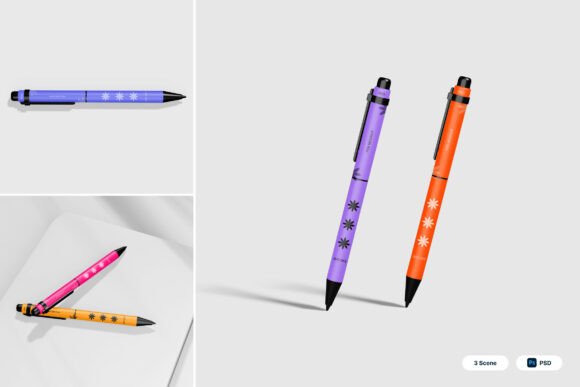
This mockup package comes with three Photoshop (PSD) files, each offering a different arrangement of pens set within a clean, well-lit scene. These compositions are crafted to highlight the sleek bodies and glossy finishes of pens, making them ideal for presenting premium or branded stationery. The inclusion of smart object layers allows users to easily insert their own designs by simply double-clicking a layer, placing the artwork, and saving the changes.
In addition to the editable PSD files, users receive a PDF help guide that walks them through the setup and customization process. The mockup is delivered at a resolution of 4000 x 3000 pixels with a 300 dpi setting, ensuring print-ready quality for both digital and physical presentations. It's important to note that any background images or stock photos used in the scenes are not included in the package and must be sourced separately.
Why Designers and Brands Might Consider This Mockup
For businesses and designers working on stationery branding, the Pen 3D Mockup offers an efficient way to visualize concepts before production. Whether the goal is to pitch a new pen design to stakeholders, create packaging mockups, or generate product visuals for marketing materials, this tool helps bridge the gap between concept and reality. Its clean compositions and soft lighting ensure that the focus remains on the pen itself, making it especially useful for corporate branding, school merchandise, and promotional product design.
One of the main appeals of this mockup is its versatility. It supports multiple pen arrangements, allowing users to select the layout that best suits their project. This flexibility is particularly valuable for companies developing souvenir collections, signature packaging, or retail-ready stationery sets, as it enables them to present products in a variety of contexts without the need for multiple mockup files.
Key Benefits of Using the Pen 3D Mockup
- High-quality visuals: The 300 dpi resolution ensures sharp, detailed output suitable for both digital and print use.
- Customizable branding: Smart object layers allow for seamless integration of logos, patterns, and color variations.
- Time and cost efficiency: Eliminates the need for photography sessions or physical prototypes during the design phase.
- Professional presentation: Clean, realistic lighting and composition enhance the perceived value of the product.
Tradeoffs and Considerations
While the Pen 3D Mockup offers many advantages, it’s important to understand its limitations. Since it's a digital mockup, it cannot fully replicate the tactile experience of a physical pen. Additionally, because the background images are not included, users must either create or license their own imagery to complete the scene, which can add time and cost to the process.
Another consideration is software dependency. The mockup requires Adobe Photoshop to edit, which may be a barrier for those unfamiliar with the program or who don’t have access to it. While the included help guide provides instructions for basic use, more complex modifications may require intermediate design skills.
When the Pen 3D Mockup Is a Strong Fit
This mockup is particularly well-suited for projects where visual clarity and brand consistency are priorities. It works well for:
- Corporate stationery branding: Presenting pens with company logos in a polished, professional setting.
- Promotional product design: Showing how branded pens will look in promotional kits or giveaways.
- E-commerce product visuals: Offering high-quality images for online retail without the need for photo shoots.
- Design portfolio presentations: Displaying pen concepts in a realistic context to impress clients or stakeholders.
When Alternatives Might Be Worth Considering
Depending on the project’s scope and audience, alternative tools or methods may be more appropriate. For instance, if a project requires 360-degree views or interactive elements, a 3D modeling software or augmented reality presentation might offer a more immersive experience. Similarly, if the goal is to showcase a pen’s functionality—such as ink flow or ergonomic grip—video demonstrations or physical prototypes may be more effective than static images.
For those who don’t use Adobe Photoshop or prefer a more intuitive interface, there are online mockup generators and design platforms that offer drag-and-drop customization. While these may not provide the same level of detail or resolution, they can be a faster and more accessible option for simpler projects.
Practical Insights for Decision-Making
When evaluating whether the Pen 3D Mockup aligns with your project needs, consider the following factors:
- End-use: Will the visuals be used for print, web, or presentation? High-resolution mockups like this one are ideal for print and professional use.
- Design complexity: If your pen design includes intricate patterns or color gradients, the smart object feature allows for precise customization.
- Available resources: Do you have access to Photoshop and the time to customize the scenes? If not, simpler tools may be more efficient.
- Target audience: If your audience values realism and detail, this mockup delivers a high-end presentation. If speed and simplicity are more important, consider lightweight alternatives.
Final Thoughts
The Pen 3D Mockup is a valuable asset for designers, marketers, and business owners looking to present stationery products in a professional and visually engaging manner. Its combination of high-resolution detail, customizable branding options, and clean compositions makes it a strong contender for branding, promotional, and retail-focused projects. However, like any design tool, it’s most effective when used in alignment with project goals, available resources, and audience expectations. By carefully evaluating these factors, users can determine whether the Pen 3D Mockup is the right fit for their specific needs.