Understanding the Value of a Modern Paper Cup 3D Mockup for Branding and Presentation
In today’s competitive market, visual presentation plays a critical role in how consumers perceive a brand. Whether you’re launching a new coffee shop, promoting a beverage line, or designing takeaway packaging, having a compelling visual representation can make all the difference. This is where a modern paper cup 3D mockup comes into play. It offers a realistic, high-quality way to showcase your design in a professional context without the need for physical prototypes.
What Is a Paper Cup 3D Mockup?
A paper cup 3D mockup is a digital template that allows designers to visualize their artwork on a realistic 3D model of a disposable paper cup. These mockups are typically created using advanced graphic design software like Adobe Photoshop and come with smart object layers that make it easy to insert custom designs. The result is a lifelike image that can be used for presentations, marketing materials, or product packaging previews.
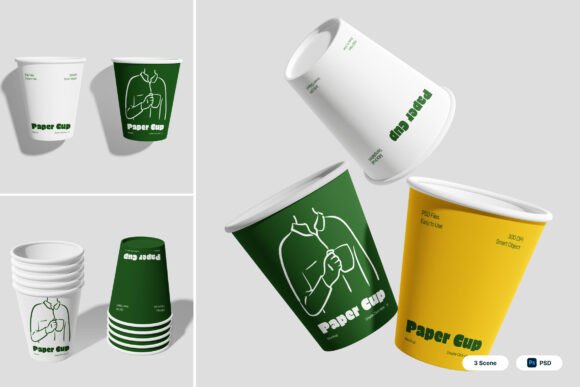
The mockup described here includes three distinct PSD files, each offering a unique presentation style. With realistic disposable cup shapes, smooth matte surfaces, and clean floating presentation scenes, this set is designed to elevate your branding visuals with minimal effort.
Why Use a Paper Cup 3D Mockup?
Using a 3D mockup is more than just about aesthetics—it’s about efficiency, professionalism, and making a strong first impression. Here are some key reasons why a paper cup 3D mockup is an essential tool for designers and business owners alike:
- Cost-effective design testing: Instead of printing multiple physical samples, you can test your designs digitally, saving both time and money.
- Professional presentation: High-quality visuals help clients and stakeholders better understand your design concept and its real-world application.
- Marketing readiness: Whether you’re updating your café’s branding or launching a new drink promotion, mockups provide ready-to-use visuals for websites, social media, and packaging materials.
- Flexibility and customization: With smart object layers, editing your design is as simple as double-clicking a layer, inserting your artwork, and saving the changes.
Key Features of This Paper Cup 3D Mockup Set
This particular mockup collection is designed with both usability and visual appeal in mind. Here are some of its standout features:
- Three high-resolution PSD files: Each file offers a different scene layout, allowing for diverse presentation options.
- Smart object layers: Simply double-click the designated layer, place your design, and save. No need for complex adjustments or manual scaling.
- Vibrant color variations: The mockup includes cup designs in vibrant green, yellow, and minimal white to suit a variety of branding needs.
- Realistic shadows and stacked compositions: These elements add depth and dimension to your visuals, making them appear more lifelike and professional.
- High-resolution output: At 4000 x 3000 pixels and 300 dpi, these mockups are print-ready and suitable for both digital and physical marketing materials.
- PDF help file included: A comprehensive guide ensures even beginners can navigate and use the mockup files effectively.
Who Can Benefit from This Mockup?
The versatility of this mockup makes it suitable for a wide range of professionals and businesses. Here are just a few examples:
- Coffee shops and cafés: Showcase your brand identity on takeaway cups to attract more customers and build brand recognition.
- Food and beverage businesses: Whether you're launching a new juice bar or promoting a soft drink line, this mockup helps visualize packaging before production.
- Graphic designers: Present your design work to clients in a realistic context, helping them visualize the final product.
- Marketing teams: Use the mockups in promotional campaigns, social media posts, or digital ads to create a cohesive brand image.
- Entrepreneurs and startups: Test your product packaging concepts before investing in large-scale production runs.
How to Use the Mockup Effectively
To get the most out of your paper cup 3D mockup, follow these best practices:
- Start with a clean design: Make sure your artwork is high-resolution and properly formatted before inserting it into the smart object layer.
- Match the color scheme: Choose cup variations (green, yellow, or white) that align with your brand colors for a cohesive look.
- Experiment with layouts: Use the three included PSD files to create different presentation styles, such as floating scenes or stacked compositions.
- Pay attention to shadows and depth: Adjust lighting and shadows manually if needed to enhance realism and make your design stand out.
- Export in multiple formats: Save your final mockup in both high-resolution and web-optimized formats for use across different platforms.
Common Misconceptions About Mockups
Despite their usefulness, many people still underestimate the value of mockups or misunderstand how to use them effectively. Here are a few common misconceptions and the truth behind them:
- Misconception: Mockups are only for large companies or professional designers.
Reality: With user-friendly features like smart object layers and included help guides, even beginners can use mockups effectively. - Misconception: You can’t customize mockups to fit your brand.
Reality: Most mockups, including this one, allow for full color and design customization to match your specific needs. - Misconception: Mockups are time-consuming to use.
Reality: Once you understand how to work with smart layers, inserting your design takes just a few minutes.
Real-World Applications of This Mockup
Let’s explore a few real-world examples of how this mockup can be applied in different industries:
- Coffee Shop Rebranding: A local café decides to update its branding and uses the white cup variation to showcase a minimalist logo design. The mockup helps them visualize the final product and pitch the concept to investors.
- Soft Drink Launch: A startup beverage company uses the yellow cup variation to present their new summer drink line. The vibrant color and clean presentation help them stand out during a product pitch meeting.
- Eco-Friendly Branding: A sustainability-focused café uses the green cup variation to align with their eco-conscious values. The realistic shadows and matte finish make the design look premium and professional.
Conclusion: A Must-Have Tool for Modern Branding
In the fast-paced world of branding and marketing, having a reliable and visually appealing way to present your designs is essential. The modern paper cup 3D mockup described here offers everything you need to showcase your work professionally—realistic visuals, customizable color options, and easy-to-use smart object layers. Whether you're a designer, entrepreneur, or business owner, this mockup can help you bring your ideas to life and make a lasting impression on your audience.
By investing in quality mockup templates, you not only streamline your design process but also ensure that your brand is presented in the best possible light. With high-resolution output and detailed presentation scenes, this mockup set is a valuable asset for any beverage-related branding project.
If you're looking to enhance your product visuals, improve client presentations, or simply test your ideas before production, a paper cup 3D mockup like this one is definitely worth considering. Start exploring the possibilities and take your branding to the next level.