Guideline Book 3D Mockup: A Professional Tool for Brand Identity Presentations
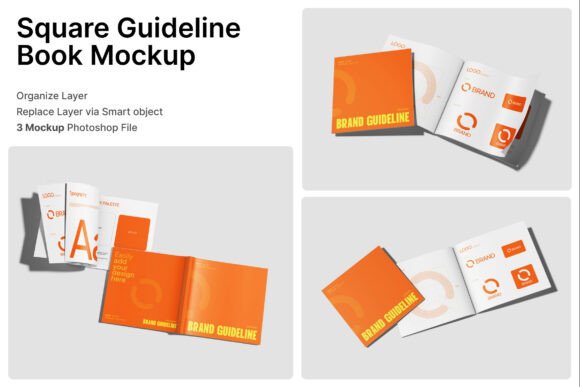
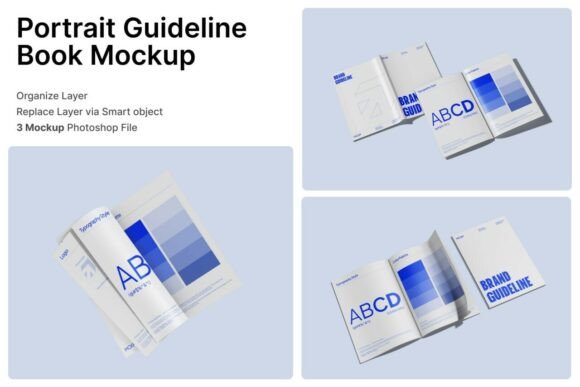
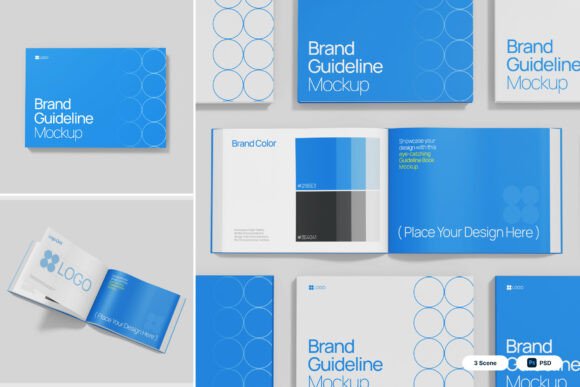
The Guideline Book 3D Mockup is a carefully designed digital asset tailored for creative professionals, branding agencies, and business teams who need to showcase visual identity systems in a polished, realistic format. Unlike generic presentation templates, this mockup series emphasizes structured layouts, editorial-quality spreads, and hardcover realism, making it particularly suitable for brand manuals, company presentations, and marketing documentation.
Featuring three high-resolution PSD files and a detailed help guide, the package allows users to integrate their own designs through smart object layers. This functionality streamlines the customization process, enabling designers to present their work without the need for complex editing or external rendering tools. The bright blue and white color palette adds a modern, corporate tone, supporting a clean and professional aesthetic that aligns well with structured identity systems.
What Sets Guideline Book 3D Mockup Apart?
Among the many 3D mockup options available, the Guideline Book 3D Mockup stands out for its editorial precision and branding-centric design. Many mockup templates focus primarily on visual appeal or minimalism, often at the expense of practicality for identity documentation. This package, however, bridges the gap between aesthetic presentation and functional layout, offering realistic hardcover textures, clean page transitions, and consistent margins that reflect the quality expected in formal brand guidelines.
Its 4000 x 3000 pixel resolution at 300 dpi ensures that every detail remains sharp, whether viewed on screen or printed for physical review. The inclusion of a PDF help file further enhances usability, especially for those who may not be deeply familiar with Photoshop’s smart object workflow. This combination of high fidelity and accessibility makes it a strong contender for professionals who need to communicate brand standards with clarity and visual impact.
Comparing Guideline Book 3D Mockup with Similar Options
When evaluating 3D mockup tools, users often consider factors such as layout flexibility, realism, file compatibility, and ease of use. Many alternatives offer broad versatility across different product types—such as mobile apps, packaging, or apparel—but may lack the editorial depth needed for comprehensive brand manuals. In contrast, the Guideline Book 3D Mockup is specifically optimized for identity-focused content, with layouts that support multi-page spreads, logo placements, color swatches, and typography examples.
Some general-purpose mockup sets provide a wider variety of scenes and formats, which can be advantageous for multidisciplinary creatives. However, these often sacrifice the level of detail required for brand documentation. The Guideline Book 3D Mockup avoids this tradeoff by focusing on a narrower use case, ensuring that each layout is purpose-built for identity systems rather than being a one-size-fits-all solution.
Strengths and Tradeoffs of Guideline Book 3D Mockup
One of the primary strengths of this mockup package is its ability to convey professionalism and brand consistency. The structured layouts and hardcover realism lend credibility to brand presentations, especially when pitching to corporate clients or internal stakeholders. Additionally, the smart object integration simplifies the design insertion process, allowing users to update visuals without compromising the integrity of the mockup’s composition.
However, there are some limitations to consider. Because the package is tailored for brand identity use, it may not be as adaptable for other presentation formats such as product showcases or digital portfolios. Users seeking a more flexible or multi-purpose mockup solution may find themselves needing to supplement this package with additional assets. Furthermore, while the included help guide is useful, those unfamiliar with Photoshop may still encounter a learning curve when adjusting layers or fine-tuning details.
When to Choose Guideline Book 3D Mockup
The Guideline Book 3D Mockup is best suited for professionals who regularly create or present brand identity systems. This includes creative directors, graphic designers, marketing teams, and branding consultants who need to deliver polished, visually accurate brand guidelines to clients or stakeholders. Its editorial-style layouts make it ideal for presenting logo variations, color palettes, typography systems, and usage examples in a cohesive format.
If your work involves crafting identity documents that require a high level of detail and realism, this mockup package can significantly streamline your presentation process. It is particularly valuable when you need to showcase a brand’s visual language in a way that feels both professional and tangible—something that flat or generic templates often fail to achieve.
When to Consider Alternatives
While the Guideline Book 3D Mockup excels in identity-focused presentations, it may not be the best fit for every project. For instance, if you're preparing a presentation that includes a mix of branding materials and other design deliverables—such as web interfaces, packaging mockups, or social media visuals—you may benefit more from a broader mockup collection that offers diverse formats.
Additionally, if your workflow primarily relies on non-Photoshop tools, or if you prefer drag-and-drop simplicity without layer editing, you may want to explore alternative presentation tools that offer similar realism with more intuitive interfaces. Some web-based mockup platforms allow for quick customization without requiring design software, which can be a significant advantage for less technically inclined users.
Realistic Use Cases and Practical Comparisons
Consider a branding agency tasked with delivering a new visual identity to a corporate client. Using the Guideline Book 3D Mockup, the team can compile all essential brand elements—logo usage, color breakdowns, font pairings, and application examples—into a cohesive, high-quality mockup that mimics a professionally printed manual. This not only enhances client perception but also ensures that the brand’s guidelines are communicated clearly and consistently.
In contrast, a freelance designer working on a portfolio presentation that includes both branding and web design samples might find this mockup too specialized. In such a case, a more versatile mockup set that includes digital screen previews and print layouts could offer a better balance of flexibility and visual impact.
Similarly, a startup founder preparing a pitch deck that includes brand visuals alongside product mockups may benefit from a different type of presentation tool—one that integrates branding elements with app or device mockups to provide a more comprehensive overview of the brand and product experience.
Making an Informed Choice
Selecting the right mockup solution depends on your specific needs, technical comfort level, and the nature of your presentation. The Guideline Book 3D Mockup offers a highly specialized, well-structured approach that is particularly effective for brand identity documentation. Its clean layouts, professional aesthetic, and smart object integration make it a valuable asset for those who prioritize clarity and consistency in brand presentations.
However, it's important to evaluate whether this level of specialization aligns with your project requirements. If your presentations typically span multiple formats or require a more flexible layout system, exploring alternative mockup tools may be a better fit. Ultimately, the goal is to choose a solution that enhances your work without limiting your creative or communicative flexibility.